





Experience seamless financial transactions at Nuebe Gaming Payment Methods, the epitome of convenience for depositing and withdrawing. Whether using GCASH or PAYMAYA, the process is effortlessly streamlined.
✅FOR DEPOSITS, login, select GCASH OR PAYMAYA, enter the amount, and enjoy instant crediting.
✅FOR WITHDRAWALS, visit the Wallet Section, choose GCASH or PAYMAYA, input the amount, and relish swift and hassle-free transactions.
At Nuebe Gaming, recognized as the best online casino in the Philippines, we take pride in offering our players a seamless and efficient financial experience when depositing and withdrawing funds. We ensure a hassle-free process by utilizing the widely popular mobile payment options GCASH and PAYMAYA.
Log in to your Nuebe Gaming account, access the wallet section, choose GCASH as your preferred payment method, enter the desired deposit amount, confirm the transaction details, and enjoy instant funds credited to your account.
For withdrawals, visit the wallet section, select the withdrawal option, choose GCASH, input the withdrawal amount, verify transaction details, and experience swift and hassle-free withdrawals, with funds transferred directly to your GCASH account.
Log in to your Nuebe Gaming dashboard, navigate to the wallet section, choose PAYMAYA as your preferred payment deposit method, enter the desired deposit amount, confirm the transaction details, check your fund account.
For withdrawals, visit the wallet section, select the withdrawal option, select PAYMAYA, input the withdrawal amount, verify transaction details, and confirm the withdrawal, with funds transferred directly to your PAYMAYA account.
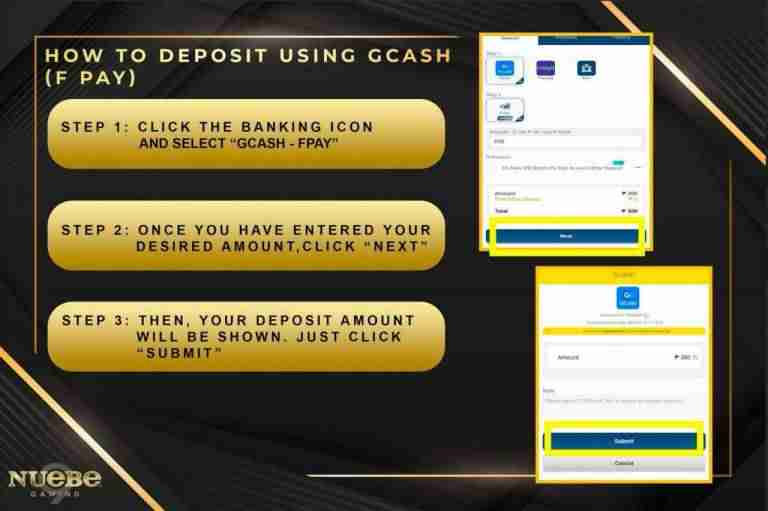
STEP 1: CLICK THE BANKING ICON AND SELECT ” GCASH – FPAY”
STEP 2: ONCE YOU HAVE ENTERED YOUR DESIRED AMOUNT, CLICK “NEXT”
STEP 3: THEN, YOUR DEPOSIT AMOUNT WILL BE SHOWN. JUST CLICK “SUBMIT”.
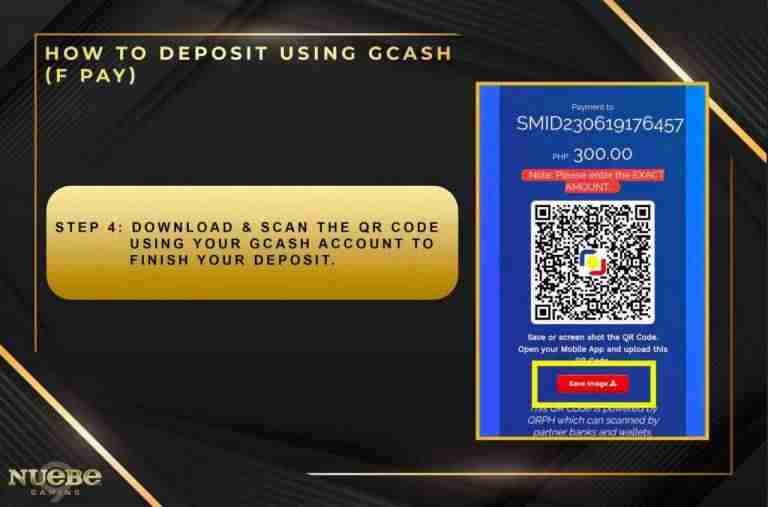
STEP 4: DOWNLOAD & SCAN THE QR CODE USING YOUR GCASH ACCOUNT TO FINISH YOUR DEPOSIT.